OctaChainer is a Windows and OS X tool for creating sample chains and slice data for the Elektron Octatrack and Analog Rytm. New in this version is a new “Megabreak”-mode (explained further down), a redesigned UI with a tab for each mode and options for normalization, fade-ins and outs.
NB: a newer version 1.3.1 of this tool is now available.
You might get warnings from the OS telling you the program isn’t signed or not from the App Store. Also, the GUI will not scale well in windows on a high-DPI screen. Right click on the .exe file, go to Properties -> Compatibility. Check “Override high DPI scaling” and set “Scaling performed by” to “System”.
How to use this tool
The Octatrack stores metadata for samples in “.ot” files. Those files contains various sample settings, including data for slices. This tool can generate those files alongside the actual .wav samples. Octatrack users should copy both the .wav and corresponding .ot file to the Octatrack. Turn on slice mode, and the slices will already be there.
There is no corresponding metadata file for the Rytm, nor do the machine support slices in the same way as on the Octatrack. Rytm owners chain samples by creating an evenly spaced grid and then using the sample start parameter on the machine to select which sample to play. OctaChainer have a dedicated mode for this use as well.
Note: This tool will convert bit depth and between mono and stereo. It will NOT resample the audio when changing sample rate.
Octatrack slices mode
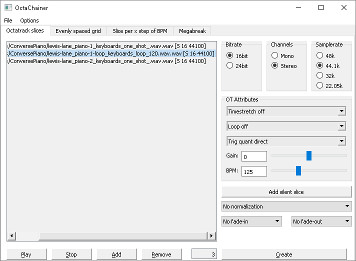
This is the “main” mode of OctaChainer. Load a collection of samples, arrange them in the order you want and generate one long .wav file with a corresponding .ot file containing the slice data and whatever settings you have set in the “OT Attributes” section. The text in brackets in the sample list indicates if a loaded sample is mono or stereo, as well as sample and bit rate.
You can optionally choose to normalize each slice separately or the final audio file as a whole. You can also set a short linear fade-in or out per slice to help avoid audible “clicks”. The “Add silent slice” button adds a 1 second silent slice. You can use these as place-holder slices or to make sure, say, a collection of drum kit chains all have their snares on a specific slice number.
Evenly spaced grid mode
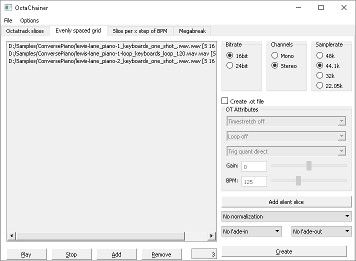
This mode is mainly for Rytm users. It will generate an evenly spaced grid where the longest loaded sample will dictate the length of each sample in the grid. All shorter samples will be padded with silence.
Rytm owners will need to generate a chain with a sample count that 120 is divisible by. The “Add silent slice” option is therefore useful to bump the total sample count up to a usable number. An .ot file can optionally be generated too, for those who own both machines and want to use the same chain on both.
Slice per X step of BPM mode
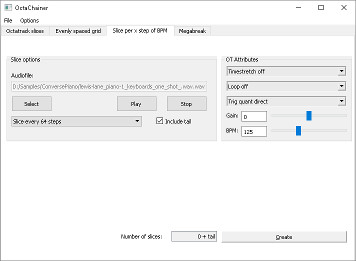
This mode is for Octatrack owners only and is a bit trickier to explain. It does not generate an audio file, just .ot metadata. Imagine that you have a long sample of arbitrary length. It could be a backing track, for instance. If you want slices that are each, say, exactly one pattern long, this mode lets you do that.
Load your sample, set the BPM and select how many steps you want each slice to be. Hit generate and an .ot file will be created next to the audio file you selected.
The “Include tail” option lets you decide if you want a slice for whatever is “left” at the end of the audio file after the last full-length slice.
Megabreak mode
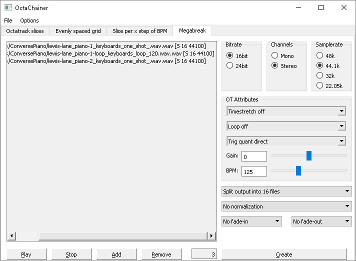
Several years ago, inventive Elektronauts user “wascal” came up with a very clever way to reorganize slices and explained the technique in this thread. In his video demo he uses breakbeats, but it works well for melodic loops as well.
I’d check the thread for details, but the basic idea is to take a selection of samples, slice them all into the same number of parts, and then save new audio files, one with the first part of each source sample, the next with all the second parts, etc. The purpose of this is to be able to use modulation or the crossfader to move between samples.
Finishing off
The tool is completely free and the source code available as public domain. If you like it, I’d appreciate if you took the time to check out our music. Any shares or other form for support would be most appreciated.
There might be bugs. If you find any or have ideas for new features, feel free to comment below. I seriously doubt that using this tool can harm your Octatrack in any way, but use at your own risk.


 Tic Tic
Leave a reply to Clicksandpops Cancel reply