Electronic music and more

OctaChainer v1.3

Category:

4–6 minutes

read

OctaChainer is a Windows and OS X tool for creating sample chains and slice data for the Elektron Octatrack and Analog Rytm. New in this version is a new “Megabreak”-mode (explained further down), a redesigned UI with a tab for each mode and options for normalization, fade-ins and outs.

NB: a newer version 1.3.1 of this tool is now available.

OctaChainer_v1_3_Windows.zip

OctaChainer_v1_3_OSX.dmg

You might get warnings from the OS telling you the program isn’t signed or not from the App Store. Also, the GUI will not scale well in windows on a high-DPI screen. Β Right click on the .exe file, go to Properties -> Compatibility. Check “Override high DPI scaling” and set “Scaling performed by” to “System”.

How to use this tool

The Octatrack stores metadata for samples in “.ot” files. Those files contains various sample settings, including data for slices. This tool can generate those files alongside the actual .wav samples. Octatrack users shouldΒ copy both the .wav and corresponding .ot file to the Octatrack. Turn on slice mode, and the slices will already be there.

There is no corresponding metadata file for the Rytm, nor do the machine support slices in the same way as on the Octatrack. Rytm owners chain samples by creating an evenly spaced grid and then using the sample start parameter on the machine to select which sample to play. OctaChainer have a dedicated mode for this use as well.

Note: This tool will convert bit depth and between mono and stereo. It will NOT resample the audio when changing sample rate.

Octatrack slices mode
OctaChainer_main
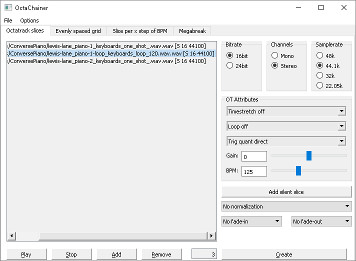
Main mode of OctaChainer. Loaded samples are saved as a single samplechain with a corresponding .ot file

This is the “main” mode of OctaChainer. Load a collection of samples, arrange them in the order you want and generate one long .wav file with a corresponding .ot file containing the slice data and whatever settings you have set in the “OT Attributes” section. The text in brackets in the sample list indicates if a loaded sample is mono or stereo, as well as sample and bit rate.

You can optionally choose to normalize each slice separately or the final audio file as a whole. You can also set a short linear fade-in or out per slice to help avoid audible “clicks”. The “Add silent slice” button adds a 1 second silent slice. You can use these as place-holder slices or to make sure, say, a collection of drum kit chains all have their snares on a specific slice number.

Evenly spaced grid mode
OctaChainer_grid
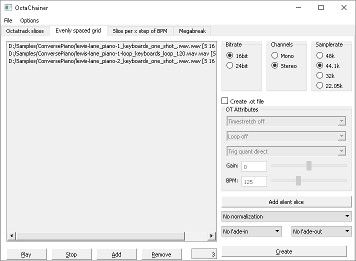
Evenly spaced grids for Rytm users

This mode is mainly for Rytm users. It will generate an evenly spaced grid where the longest loaded sample will dictate the length of each sample in the grid. All shorter samples will be padded with silence.

Rytm owners will need to generate a chain with a sample count that 120 is divisible by. The “Add silent slice” option is therefore useful to bump the total sample count up to a usable number. An .ot file can optionally be generated too, for those who own both machines and want to use the same chain on both.

Slice per X step of BPM mode
OctaChainer_step
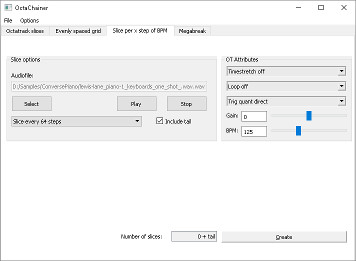
This mode generates slices of a length given in steps. It is calculated from the indicated BPM.

This mode is for Octatrack owners only and is a bit trickier to explain. It does not generate an audio file, just .ot metadata. Imagine that you have a long sample of arbitrary length. It could be a backing track, for instance. If you want slices that are each, say, Β exactly one pattern long, this mode lets you do that.

Load your sample, set the BPM and select how many steps you want each slice to be. Hit generate and an .ot file will be created next to the audio file you selected.

The “Include tail” option lets you decide if you want a slice for whatever is “left” at the end of the audio file after the last full-length slice.

Megabreak mode
OctaChainer_megabreak
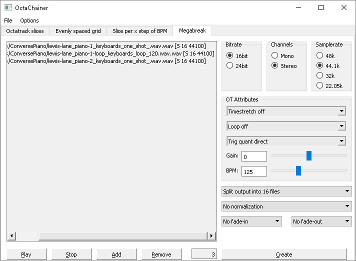
Reorganize samples for the so-called “Megabreak of Doom” method.

Several years ago, inventive Elektronauts user “wascal” came up with a very clever way to reorganize slices and explained the technique in this thread. In his video demo he uses breakbeats, but it works well for melodic loops as well.

I’d check the thread for details, but the basic idea is to take a selection of samples, slice them all into the same number of parts, and then save new audio files, one with the first part of each source sample, the next with all the second parts, etc. The purpose of this is to be able to use modulation or the crossfader to move between samples.

Finishing off

The tool is completely free and the source code available as public domain. If you like it, I’d appreciate if you took the time to check out our music. Any shares or other form for support would be most appreciated.

There might be bugs. If you find any or have ideas for new features, feel free to comment below. I seriously doubt that using this tool can harm your Octatrack in any way, but use at your own risk.

Back to main page

39 responses to “OctaChainer v1.3”

  1. Korhan Erel Avatar
    Korhan Erel

    The app crashes everytime when I put in 64 short stereo samples in 24bit/44.1Khz and try to chain them in Octatrack Slices mode with slice normalization, 1ms fade in and 10ms fade out.

    1. aphyyd Avatar
      aphyyd

      same, man, same

  2. Jacek Avatar
    Jacek

    Hi

    I’m on windows (10) and drag’n’drop isn’t possible. It’s bit trickier than in 1.2 version this way.
    Any hope of fixing this. Thanks a lot:)

    1. Kai Drange Avatar
      Kai Drange

      I think it would be a very easy fix. The reason it isn’t there is simply that I never use drag’n’drop myself and had forgotten that it used to be there!

      1. Jacek Avatar
        Jacek

        That would be great – thank you:)

      2. Teo Aevin Avatar
        Teo Aevin

        drag’n’drop would be welcome on the mac os version as well πŸ™‚
        oh .. and a ‘clear all’ button (or at least be able to CMD+A to select all) would be cool !
        thanks a lot for this great lil app

  3. SC Avatar
    SC

    Hi, thanks for this great app. I do not understand how to use the magabreak mode because of what could be a bug.
    When using 16 samples splitted in 16 everything works as expected. But when I try to use 64 samples the software outputs only 16 slices. If I ask for 64 output files then I have the correct amount of slices but of course 64 files instead of 16…I know other people on elektron forum have mentionned similar issues. Is there a way to output 64 samples matrixed in 64 slices X 16 files ? Thanks a lot for your time.

    1. Kai Drange Avatar
      Kai Drange

      Yes, I saw sezare56 on Elektronauts discovered that it wouldn’t output more than 16 files max. So it must be a bug, but I never got around to looking into it. It is likely very easy to fix, so I have been meaning to fix that and the drag&drop functionality for quite some time now. But for whatever reasons I have never gotten around to it. Sorry about that! I’ll try to get it done soon. Nice to know someone finds the megabreak mode useful. πŸ™‚

      1. SC Avatar
        SC

        Awesome, thanks for the reply and support !

  4. SHS Avatar
    SHS

    I can’t run this app on Windows XP. Is it normal? ))

    1. Kai Drange Avatar
      Kai Drange

      Hmm, I have no idea, to be honest. I don’t have a WinXP computer around, so I have never tried…

  5. Clicksandpops Avatar
    Clicksandpops

    Amazing app! Wondering if you can have a mode where you can drag more samples than the 64 and then it makes multiple stems? That way you don’t need to count the samples to make stems. Hopefully this makes sense.

  6. Manuel SΓ‘nchez Avatar
    Manuel SΓ‘nchez

    Hi, I have some chains I sampled manually (theyΒ΄re SEGA Genesis sound effects, maybe 37 or 39 sounds sampled one by one in a file). What is the best way to create the slices or the .ot file?

  7. Jordan Avatar
    Jordan

    Hey there!

    Just used this app on longer samples and it worked perfectly. However, when trying to use it on very short samples 1-2 seconds, it did not seem to correctly create the longer audio file.

    1. Kai Drange Avatar
      Kai Drange

      Thank you for the bug report! Do I understand you correctly in that the combining short (1-2 sec) samples and very long ones (would that be 5-6 minutes, perhaps?) in the same chain doesn’t work properly? I don’t think I have ever tried that myself. I will look into it if/when I get around to fixing some other reported issues. (Drag&drop isn’t working and more than 16 samples in megabreak mode doesn’t work, either). I have been meaning to fix these for a long time, but for whatever reason I keep putting it off…

  8. rparmar Avatar
    rparmar

    No matter what files I use and what mode, this app fails to create correct output. The WAV file is always 44 bytes long! On Windows 10, using latest version.

    1. Kai Drange Avatar
      Kai Drange

      Hmm. I have no idea why, unfortunately. I haven’t heard of anyone else having this problem, either, so I have nothing to suggest. Sorry. 😦

      I initially made this as a quick-and-dirty tool for my own use, but when others found it useful I added some more features and tried to make it a bit more user friendly. But it is not a robust piece of software. Very little error-handling, no logging of problems, etc. So when something unexpected occurs it just crashes. That makes it really hard to track down issues that I’m not able to replicate at my end. One of several issues I should fix if I do a new version, but something I’m unlikely to get around to at this point…

    2. Robin Fisher Avatar
      Robin Fisher

      I had this issue but I realised I was trying to import AIF files. Tried again with Wavs and it works

  9. Dylan Gauthier Avatar
    Dylan Gauthier

    Every time i try to “create” the software crashes.

    1. Kai Drange Avatar
      Kai Drange

      Do you also get a 44 bytes long WAV like rparmar does?

  10. rparmar Avatar
    rparmar

    OK, understood. I really have tried every single option, every type of file, as well as using version 1.2. All efforts produce an OT file and the 44 byte WAV, though with no crashes as such. It does seem that I am the only one with this problem, even though my Windows 10 install is standard and I regularly use an rather large suite of audio-visual software with no problems (Reaktor, Max, Samplitude, DaVinci Resolve, etc.) Ongoing discussion here:
    https://www.elektronauts.com/t/octachainer-v1-2/

    Can you share or point me to documentation for the OT file format? I can’t quite understand the C++ code. I am thinking that it would be great to have a utility that converted standard DAW output.

    In the meantime, I am creating equal-size slice files myself in Samplitude. Which works, but wastes OT memory.

    1. Kai Drange Avatar
      Kai Drange

      As far as I know there is no documentation for the OT file format. The OTData struct in otwriter.h in the OctaChainer source is probably your best bet.

      https://github.com/KaiDrange/OctaChainer/blob/master/otwriter.h

      You’d also have to sum all the byte values and save the result as a ‘checksum’ byte at the end.

  11. Iluminataa Avatar
    Iluminataa

    I’m not getting any audio from the playback on Windows 10 (x64), it doesn’t seem to be doing much of anything, though I can add files to each type of output. Does the build need updated Qt dependencies or something?

    1. Kai Drange Avatar
      Kai Drange

      Not that I know of. I’m using the OS X version myself, so something might have changed without me noticing. I have seen others mention playback not working for them as well, but I haven’t investigated. It should still output a .wav/.ot file, though.

    2. Dan Avatar
      Dan

      yep same, excellent tool for the octa but need to be able to get playback to delete unwanted samples

    3. Thx4lttinmestywthu Avatar
      Thx4lttinmestywthu

      If this has been answered before, sorry, but would the slice info be saved to the file and understood by the blackbox 1010?
      Sometimes editing certain samples are a bit strained.

      1. Kai Drange Avatar
        Kai Drange

        No, the slice data is not stored as part of the wavefile itself, only in the separate .ot file which is only understood by the octatrack.

  12. Loadout Avatar
    Loadout

    I just started using the software, really great so far. I have two suggestions. One, is it possible to select more than one sample at a time from the list? Removing them one at a time is very tedious, as is opening and closing the program to reset the list. Second is confusing for me to explain, but I’ll try. Instead of loading 64 samples from a folder containing hundreds, being able to load the full folder and have OctaChainer output them in chunks of 64 would be really handy.

    1. Kai Drange Avatar
      Kai Drange

      Thank you for the suggestions! No need to close the application, you can use File -> New (or something similar, I don’t have it in front of me).

      Multiselect when deleting sounds useful. I also like your idea of the “add lots and create many chains”-feature.

      I am not promising I will actually do this, though. There are some bugs I have been meaning to fix for ages, but for whatever reason I haven’t done so yet. Sry, I’ll try to get around to it.

      1. Loadout Avatar
        Loadout

        Ah, I didn’t know about File > New, real time saver, brilliant.

        I’m not going to bitch about free software which actually works just because it doesn’t have some feature I’d like, OctaChainer stopped me from smashing my head against the wall trying to get GTBG to work. Cheers for the efforts, Kai.

  13. blasted_pingin Avatar
    blasted_pingin

    I’d like to suggest the format .rx2 for a future update. It carries info about slices, number of beats, BPM and more.
    That would be a great fit if OctaChainer could process these info and sort out the OT file according them..

    Keep up the good job and thanks for your input in the OT community πŸ˜‰

    1. Kai Drange Avatar
      Kai Drange

      That was actually the original idea for the tool. I sliced up some loops in ReCycle and wanted them on the OT. But the format is proprietary and requires a registered reason dev company, licence, etc. So at the time I decided against it. It would be an excellent fit, though. I might check with them if a licence is possible for a public domain hobby project like this.

      It would mean linux support is dropped. And anyone wanting to build from source would need their own licence, I suppose. Perhaps a separate Β«rex to otΒ» converter tool would be best?

  14. LV Avatar
    LV

    Amazingly helpful tool. Thank you so much for creating and sharing it!

    I’d like to +1 the multiple-select suggestion. Yes, useful for deletion but also the first step towards “load a stupid amount, select N files and export a chain of N slices”

    1. Kai Drange Avatar
      Kai Drange

      Glad you like it! I added multiselect (and multiple chains when more than 64 slices) as suggested by Loadout in the recently released v1.3.1 linked to from the top of the blog post, btw.

  15. Kai Avatar
    Kai

    Hi Kai, thanks for the great tool. Would like a feature to edit end/start points for Slice per X step. This could be for all or individually. Perhaps a list of of the slices with start and end time, that we can edit, for each slice just before you can click create. If you really want to get crazy it could have loop point time for each slice too. This could also be a feature for the other slice modes.

    Should you like a UI designer for an interface with sliders rather than text input boxes, hit me up.

  16. coin-coin Avatar
    coin-coin

    app crashes everytime on OSX 😦

  17. Amo Avatar
    Amo

    The APP Crashes every time for me now, and I do not know why.. All bitrates and sample rates are correct meaning no converting is happening. It worked fine for me for first month and now a crash everytime in use in regular OT slice chain mode. I am using MBP MacOs 10.15.17.

  18. Revvvvv Avatar
    Revvvvv

    Love your work! Its so convinent to make sample chain now.
    Though I wondering if you guys can have samplerate and bitrate convertor function in upcoming version.
    As you might know, if a 48kHZ (or higher), 32bit ( or higher) sample was throw into OCTACHAINER, it gets really weird output. So I need to converte the file before I make them in chain.

    Thanks! ❀

  19. Daniele Avatar
    Daniele

    works fine on MacOs Ventura! thanks so much for this πŸ˜€

Leave a reply to Jacek Cancel reply